

Digital Document Circulation
Reduce costs, minimize errors, and streamline every stage of document processing with automation
In the digital age, implementing electronic document circulation is the best way to solve issues with traditional paper workflows. Many companies, both in Poland and abroad, are adopting this solution. Electronic circulation reduces costs, shortens processing times, minimizes errors, and lowers risks like payment delays. It also offers full access to historical data and easier document retrieval. Document flow includes stages such as acceptance, creation, recording, processing, approval, accounting, archiving, and destruction.


Our answer to these needs
Solving document circulation related issues
The SI-FLOW solution is a product supported and developed on an ongoing basis. It currently consists of workflows that handle invoices, purchase orders, asset documents, and delegations (both in terms of requesting and billing). It is a distributed tool, i.e. it can consist of four components. Two components are mandatory: the Circulation Management module and the Content Management system.

Scanning & OCR
The process of circulation of invoices in the company begins with the receipt of the paper version from the supplier to the department or person responsible. Electronic document circulation in the company begins in the next step, i.e. when registering the document. Paper documents can be marked with a barcode, scanned, recognized by the OCR system, and transferred to the SAP system. Further handling of the electronic document depends on its purpose and takes place already on the side of the SAP system.
Workflow Management
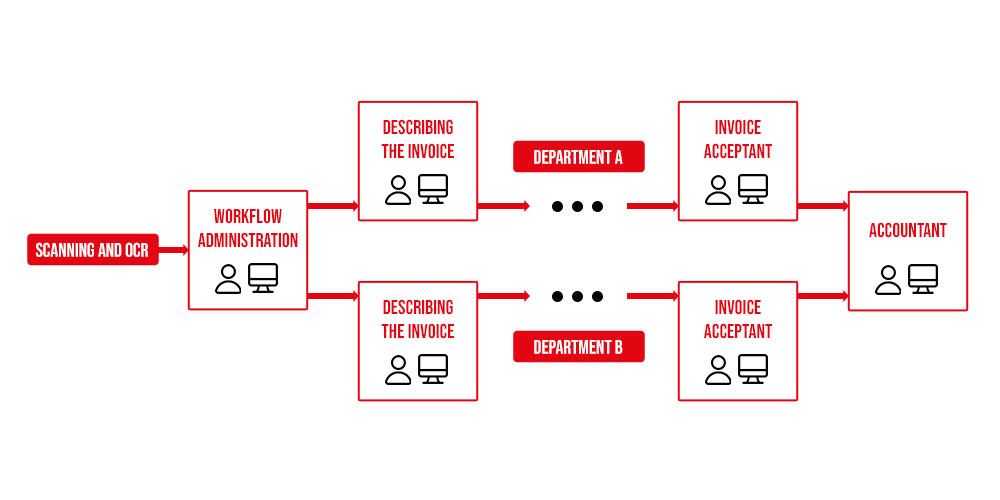
The key component is the software written in the ABAP language and integrated with the SAP ERP system. This module is used to configure and manage the operation of electronic document circulation and also allows you to use the tool from the level of the ERP system. The component is primarily used to configure the types of supported documents, set the logic and paths of their circulation in the system, and assign users to the circulation.
An example of the division of roles in the SAP system is presented below.
A great advantage of the solution is the possibility of any configuration of the above roles. The user assigned to a given role is responsible for checking and possibly filling in additional metrics.
It also allows access from the SAP ERP level and allows for all kinds of reporting on the operation of the entire tool. The module can be divided into main parts: SAP ERP user interface, Administration Panel, User Configuration, and a set of additional tools (reports, printouts, notifications). The application includes support for purchase invoices, which can be divided into two main types:
- invoices posted directly in the FI financial module (without orders in the SAP system)
- invoices posted through the MM material management module (concerning orders in the SAP system).
In addition, each of these types is divided into several subtypes. The division of documents into types and subtypes affects the way they are processed.
The user has a full preview of the scanned document with the ability to scroll, move, scale, print, and save to the local computer disk.
Individual metric tabs contain information about invoice items, detailed supplier data, history of metric circulation in the system, information about attachments (any files can be attached to the metric – MS Office Word, MS Office Excel, PDF, etc.) and comments, i.e. textual information entered by subsequent participants in the document circulation.
The system can be equipped with several additional functionalities to facilitate work and supervise the circulation of purchase invoices:
- Breaking down metric items into accounting decrees by importing breaks from MS Office Excel files,
- Handling employee replacements for the system administrator or directly for a given user,
- Sending notifications via e-mail informing about the list of documents to be processed for a given document circulation participant,
- Reporting with metrics information in the system that are still in circulation or have already been accounted for,• Reporting with metrics information in the system that are still in circulation or have already been accounted for,
- Reporting working hours of selected employees on individual documents,
- The ability to go directly from accounting documents in standard SAP ERP transactions to the document metric and scan,
- Management of document workflow participants using standard SAP transactions to maintain the company's organizational structure.
Content Management
Many analyses indicate that the vast majority of information held by the company is still in an unstructured form, which usually means storing it in the most expensive possible medium, which is paper. In addition to the high costs of administration and storage, paper is associated with long processing time (e.g. only one person at a time), difficult circulation throughout the business process, and the risk of loss of evidence or uncontrolled copying. Data in the form of HTML, e-mail, audio, video, text files, or spreadsheets are equally unfriendly to maintain.
In the process of document circulation, the user must have direct and quick access to all attachments regarding the documents being processed, as well as to the images of the documents themselves. Such data is stored using files on a separate server, and access to them is managed by the Content Management system. The stored files can be of any format, i.e. PDF, TIFF, DOC, XLS, TXT, etc. The basic functionality in the described scope is met by, among others, SAP Content Server for On-Premise solutions and SAP Document Management Service (for cloud solutions).
Before it enters the system, each paper document can be provided with a sticker with a bar code, with which it is scanned and saved on the server in the form of a TIFF or PDF file. All objects (scans) stored on the SAP Content Server have their unique identifier, which is saved in the SAP electronic invoice.
Mobile Operation
The document workflow process often involves company employees who do not necessarily have access to the SAP ERP system. In this case, the most advantageous solution is to enable participation in the circulation of documents using a web browser or mobile device. For this purpose, the solution is made available to the process participants using the solution in the SAP Fiori environment.
Benefits
- Unified document handling
- Single point for invoice entry
- Faster processing & approval
- Reduced payment delays
- Cost tracking & duplicate check
- Performance monitoring
- Live status & delay info
- Full audit trail
- Workflow control & management
- Centralized registration & archiving
- Digital approvals in SAP
- Fast, secure archive access
Advantages
- Unified interface for all workflows
- Easy to learn & administer
- Single transaction instead of many
- Role-based editing views
- Linked processes without breaks
- Highly configurable
- Flexible & scalable solution
- Custom tabs for different user roles
- Fewer manual steps, fewer errors
- Reuse of existing process paths
- Custom workflows tailored to needs
- Deep integration with SAP ecosystem
Sample for more information
Who is it for?
Our solution is aimed at all companies that use the SAP ERP system as an application to support business management.
SI-FLOW will be particularly interested in purchasing accounting and tax teams, but there are many users involved. Suitable for use in many industries.
Hier eine HL von max. 50 Zeichen:
- Hier ein Text von max. 60 Zeichen
- Hier ein Text von max. 60 Zeichen
- Hier ein Text von max. 60 Zeichen
Your experts

Pawel Rytelewski
Geschäftsführer
Consultant SAP

Pawel Wala
Geschäftsführer
Beratung SAP